Augmented reality for remote troubleshooting & service
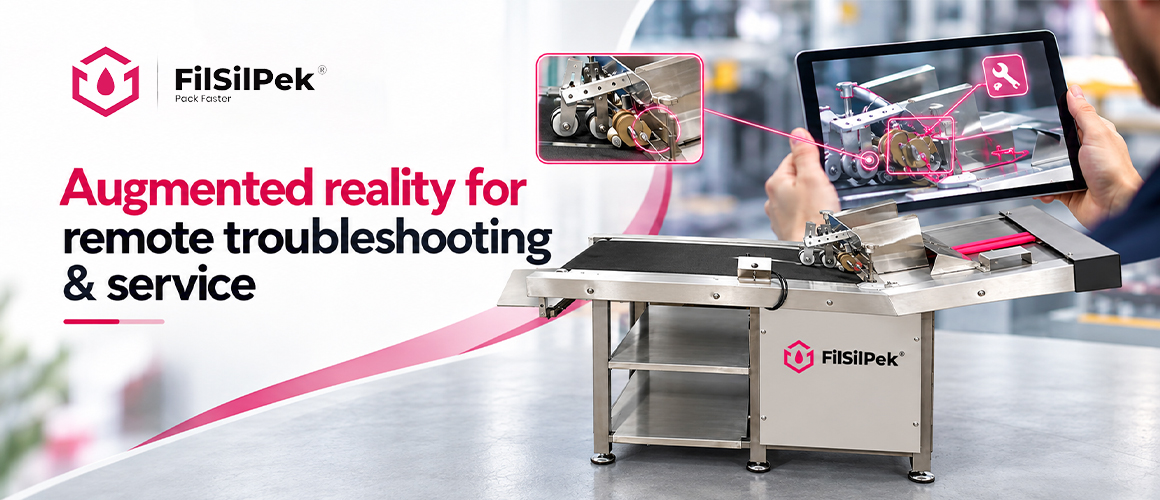
Explore how augmented reality supports remote troubleshooting and service with visual guidance, helping technicians resolve issues and reduce equipment downtime.
Introduction
The rise of AR in field service
Augmented reality transforms field work by enabling a remote expert to view the site through the technician’s device. See-what-I-see streams real time visuals while digital annotations overlay guidance on physical objects, reducing errors and accelerating repairs. This technology combines computer vision with spatial awareness to convey context as work progresses, improving problem solving and knowledge transfer between field and office.
What this article covers
This article explains how AR remote assistance works, the powering technologies involved, and practical use cases across industries. You’ll see how AR supports both SMEs and OEMs by providing visual context and real time guidance.
Key topics include:
- See-what-I-see and annotation capabilities
- Collaboration between on-site technicians and remote experts
- Industry applications from manufacturing to utilities
- Implementation considerations and best practices
AR remote assistance fundamentals
See-what-I-see and annotation capabilities
See-what-I-see streams live visuals from the job site to a remote expert, enabling faster issue identification. Digital annotations overlay guidance on the scene, helping the technician follow precise steps.
Annotations can be static or evolve in real time as conditions change. The on-site user adds markers, drawings, or notes, creating a two-way dialog that reduces guesswork and captures tacit knowledge as actionable guidance.
How AR enhances collaboration between on-site technicians and remote experts
AR ties live video to expert input without the need for travel, speeding diagnosis while preserving the as-found state.
Successful cross-location collaboration depends on synchronized views, shared workflows, and timely feedback. This leads to faster resolution, fewer repeat visits, and clearer records of actions taken during service events.
Key technologies powering AR remote troubleshooting
Computer vision and spatial anchoring
computer vision enables devices to interpret the real world in real time, identifying features and context to align digital guidance with reality. This supports precise overlays and context-aware instructions that adapt as conditions change.
Spatial anchoring locks digital annotations to tangible surfaces, ensuring overlays stay aligned when you move, reorient, or view from different angles.
Cross-device collaboration and security considerations
AR remote troubleshooting depends on fluid collaboration across devices, including smartphones, tablets, smart glasses, and headsets, all sharing a single visual session. This cohesion reduces latency and keeps everyone aligned.
Security and privacy matter. Implement robust encryption, role-based access, and controlled data sharing to safeguard sensitive equipment details while preserving seamless remote guidance.
Industry applications and use cases
Manufacturing diagnostics and repair
AR remote assistance enables maintenance teams to diagnose issues without sending specialists to the site. See-what-I-see streams paired with digital annotations guide diagnostics, calibration, and preventive maintenance in real time.
Cross-site collaboration shortens downtime and improves first-time fix rates by providing remote SME input directly on the shop floor.
Energy and utilities field service
On-site technicians can call on remote experts when inspecting turbines, substations, or transmission gear. Visual cues, overlays, and step-by-step directions help isolate faults and guide servicing in hazardous environments.
Real-time risk assessments and best-practice sequences enhance safety and diagnostic confidence for field crews.
Healthcare equipment maintenance and training
AR guides biomedical teams through routine servicing and complex repairs of critical devices. Digital annotations map to panels and components, reducing guesswork during troubleshooting.
Microsoft HoloLens 2 advances AR remote troubleshooting with a hands-free headset that blends holographic guidance into the technician’s field of view for easier see-what-I-see collaboration.
Blitz delivers AR-powered remote troubleshooting with see-what-I-see and real-time annotation, enabling technicians to connect with remote experts for faster first-time fixes.
Hands-on training with off-site experts can occur without occupying clinical assets, accelerating competency development.
OEM support and customer self-service enablement
OEMs can enable customers to self-diagnose with guided AR sessions. See-what-I-see sessions link devices with SME input, smoothing escalation and improving repair outcomes.
Remote experts deliver reusable workflows, annotated checklists, and diagnostic templates to on-site technicians, promoting standardized service across the lifecycle.
Leading AR remote assistance solutions and capabilities
Solution An overview and standout features
Solution A pairs see-what-I-see with durable digital annotations and cross-device collaboration. It prioritizes quick session setup and clear on-site guidance.
Standout features include:
- Real-time video sharing with synchronized SME input
- Persistent dynamic annotations aligned to real world surfaces
- Security-first access controls and encryption
- Offline workflow templates for intermittent connectivity
Solution B overview and standout features
Solution B is built for large scale enterprise field service with strong ERP and CMMS integration. It enables scalable collaboration across multiple teams.
Standout features include:
- Reusable playbooks for structured knowledge transfer
- Spatial mapping aligned with factory floor assets
- Role-based permissions and audit trails
- Analytics dashboards to track first-time fix rates
Solution C overview and standout features
Solution C targets OEM and customer self-service, supporting guided diagnostics and remote coaching for end users.
Standout features include:
- See-what-I-see sessions with guided workflows
- Digital checklists and annotated repair templates
- Remote expert overlays that adapt to user skill level
- Seamless handoff to on-site technicians when needed
Benefits and measurable impact
Reduced downtime and faster issue resolution
AR remote assistance accelerates problem solving by delivering real time visual guidance and contextual data directly to the technician. See-what-I-see streams paired with persistent digital annotations help the onsite team interpret the issue quickly and follow guided steps with fewer back and forth. Gartner notes that leaders in AR-assisted field service emphasize measurable improvements in first-time fix rates and downtime reduction through remote expert collaboration.
Experts can oversee the troubleshooting remotely, enabling faster validation of each action and documenting the sequence for future reference. This reduces cycle times for repairs and calibrations without compromising quality.
Improved technician safety and accuracy
Annotations map to exact controls and components, reducing guesswork in environments with high risk. Spatial anchoring keeps instructions aligned to the real surface, supporting precise adjustments even in tight or hazardous spaces.
Cross device collaboration allows off site experts to monitor safety considerations, flag potential hazards, and advise corrective actions before risky moves are made.
Cost savings and scalability of support
Remote guidance lowers travel and lodging expenses while expanding service coverage across sites. Standardized playbooks and reusable workflows enable consistent service quality at scale.
Analytics from AR sessions highlight first time fix rates, recurring failure modes, and training gaps, informing targeted improvements in processes and asset care.
Implementation considerations and best practices
Choosing the right hardware and software
Define your field service scenarios and match devices to conditions like lighting, noise, and space. Favor headsets or tablets that enable hands free use and solid on device processing.
Choose software for usability, latency, and offline use. Look for intuitive see what I see interfaces and durable annotation tools that resist drops in connectivity.
Integrating with existing workflows and ERP/CMMS
Map AR workflows to current service processes. Align with asset histories, maintenance plans, and technician routines to minimize disruption.
- Leverage reusable playbooks to standardize responses across teams
- Ensure bidirectional data flow with ERP and CMMS for ticketing and parts management
- Capture session metadata to enrich asset records after each intervention
Security, privacy, and data governance
Define access controls to limit who can view live sessions and annotations. Implement encryption for data in transit and at rest.
Establish data retention policies and audit trails to meet compliance needs. Regularly review permissions and remove outdated access.
FAQ
- What is AR remote assistance used for in field service?
AR remote assistance enables on-site technicians to collaborate with off-site experts in real time. Using see-what-I-see video sessions, digital annotations, and visual instructions, experts can guide technicians directly within the physical work environment.
- How does AR remote assistance improve problem-solving on the shop floor?
AR provides immediate visual context for diagnosing and resolving equipment issues. Technicians can receive step-by-step guidance, visual annotations, and expert support, reduce communication delays and help teams complete complex repairs more efficiently.
- What devices are best suited for AR remote troubleshooting?
The ideal devices support hands-free operation, stable connectivity, and reliable on-device processing. Head-mounted displays, smart glasses, and compatible mobile devices can help technicians access guidance while keeping their attention focused on the equipment and task.
- Is security a concern when using AR remote assistance?
Yes. AR sessions may involve sensitive operational information, so organizations should implement role-based access controls, encryption for data in transit and at rest, and audit trails for session activity. Regular permission reviews can further strengthen security.
- Can AR remote assistance integrate with existing enterprise systems?
Yes. AR platforms can integrate with systems such as ERP and CMMS platforms through bidirectional data flows, reusable troubleshooting playbooks, and automated metadata capture. This allows completed interventions and equipment insights to be added to asset histories, improving future maintenance and troubleshooting.

Adapting Filling Lines for High Viscosity Cosmetic Products
You are selecting a filling….

Filling & sealing innovations for ready to eat sauces and condiments
You’re entering a space where….
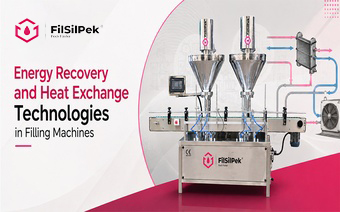
Energy Recovery and Heat Exchange Technologies in Filling Machines
Energy recovery and heat exchange technologies in filling machines….
Contact Us
Address
B-603, SHALIN SQUARE HATHIJAN CIRCLE VATVA G.I.D.C ROAD, VINZOL,AHMEDABAD-382445 GUJARAT
Contact
+91 90542 94961
Inquiry Form
Contact Us
Address
B-603, SHALIN SQUARE HATHIJAN CIRCLE VATVA G.I.D.C ROAD, VINZOL,AHMEDABAD-382445 GUJARAT
Contact
+91 90542 94961
Inquiry Form
Contact Us
Address
B-603, SHALIN SQUARE HATHIJAN CIRCLE VATVA G.I.D.C ROAD, VINZOL,AHMEDABAD-382445 GUJARAT
Contact
+91 90542 94961
Inquiry Form
Contact Us
Address
B-603, SHALIN SQUARE HATHIJAN CIRCLE VATVA G.I.D.C ROAD, VINZOL,AHMEDABAD-382445 GUJARAT
Contact
+91 90542 94961
Inquiry Form
Contact Us
Address
B-603, SHALIN SQUARE HATHIJAN CIRCLE VATVA G.I.D.C ROAD, VINZOL,AHMEDABAD-382445 GUJARAT
Contact
+91 90542 94961
Inquiry Form